Tech review: Dangbei DBOX02 Pro is ready for your living room
Published in Business News
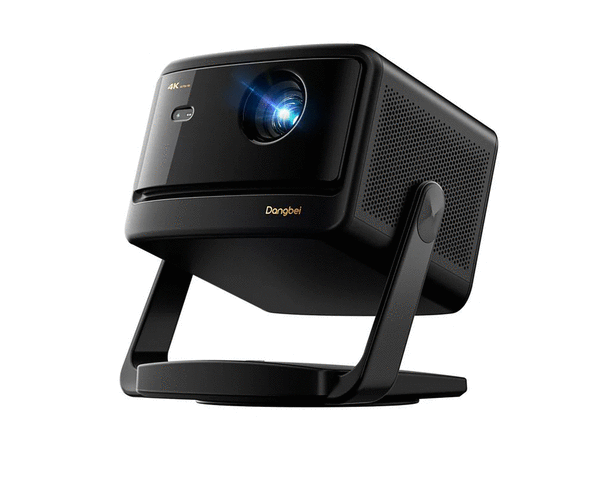
I love a big TV.
There’s nothing like watching a movie or sporting event on a really big screen, but TVs can get expensive when you’re talking about screens larger than 75 inches.
There comes a price/size where you’ll realize a projector could be a better option, depending on your room setup.
Today we are looking at the Dangbei DBOX02 Pro, a 4K Ultra HD projector with picture quality that really impressed me and you can have it project an image on your wall or screen at sizes ranging from 40 inches up to 300 inches (which is 27 feet diagonally). Optimally, Dangbei only recommends images up to 150 inches, or roughly 13 feet, diagonally. If you choose to go larger, you’ll need to be in a really dark room, and the image will be not as bright.
The DBOX02 Pro (currently $1,199, us.dangbei.com) uses a DLP laser light source with a brightness of 2,000 ISO lumens and a resolution of 3,840 x 2,160 pixels. The projector delivers HDR10+/HLG with deep blacks and enough brightness to be used for daytime viewing. It can also project 3D content, if that’s to your liking.
It runs the Google TV operating system, which is very easy to navigate and includes every app and streaming service you’d ever need, beginning with a certified Netflix app, which means your Netflix streaming experience will be smooth and clear.
The DBOX02 Pro has an ethernet port as well as Wi-Fi 6 to be used for streaming and Bluetooth 5.2 so you can connect wireless headphones.
If you don’t have an external sound system, the DBOX02 Pro has a pair of built-in 12w speakers that provide very nice sound.
Other ports include two HDMI ports — one with eARC — to connect home theater receivers, as well as a standard 3.5mm headphone jack and one S/PDIF (optical audio) output. There are also two USB-A ports for playing local media.
Setup is AI assisted with auto focus, auto keystone correction, auto screen fit, obstacle avoidance and eye protection.
The DBOX02 Pro has a built-in stand that rotates 360 degrees and tilts up to 120 degrees to make it very easy to get the best picture on your particular wall or screen or even ceiling. Interestingly, the external power supply connects to the rotating base, to make placement even easier.
If you are streaming your video through Wi-Fi, you only need to plug in the projector into the wall for electricity and you’re ready to set it up.
You can choose to set up with the Google TV operating system or as a plain-old projector, utilizing the HDMI ports if you want to show content from a computer or Roku or Apple TV device or any other HDMI source.
If you choose the Google TV setup, Dangbei takes you through the setup steps to use your phone to enter your Google account credentials, but you do have the option of using the remote to type out your email and password on an onscreen keyboard.
If you’ve ever set up a Google TV device before, Google will remember and offer to set up the projector using the same account and even load the same streaming apps.
I did learn a few things to make setup easier that I didn’t find in the manual.
Ethernet is a great option if you have a connection close by, and you can use a USB-ethernet adapter if you need it.
You can also use the USB ports to connect a mouse and keyboard for easier input and navigation if you don’t want to use the remote. This is very handy when setting things up or entering login information for new apps.
Whenever you move the projector, it will automatically run an autofocus and auto configure the picture placement options, if you have those turned on in the settings.
Overall, the DBOX02 Pro is a great choice for any living room or home theater.
Unlike some of Dangbei’s smaller projectors, this one does not come with a case to carry it around. This one is designed to park itself on a shelf or table and stay put.
Because the stand incorporates the power cable, you can’t remove it, so there is not a way to connect it to a normal ceiling mount. You’d need a shelf mount.
I was very impressed with the picture and sound quality of the Dangbei DBOX02 Pro. You don’t need an advanced IT degree to get it set up and you shouldn’t need an AV professional to help you get it looking and sounding great.
I do wish the remote had a few more buttons, and I wish it was backlit, so you could see what you’re pressing when you’re in a dark room.
My current living room TV is a 65-inch TCL, but I’m currently thinking of how I can replace it with this projector. Now, if I could only find a wall with space for a larger screen.
©2026 Tribune Content Agency, LLC.










Comments