Gadgets: Car display accessory
Published in Science & Technology News
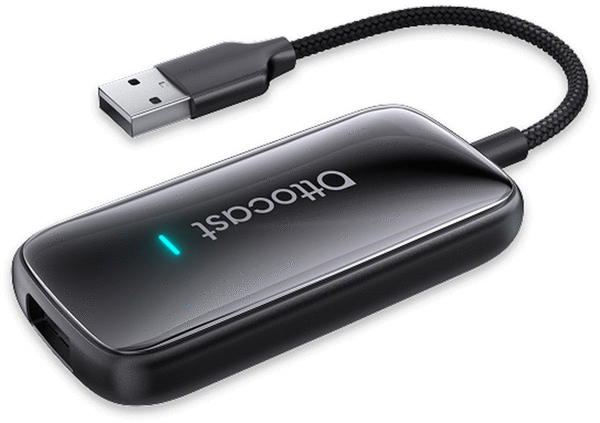
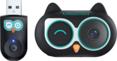
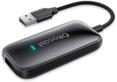
Ottocast’s Play2Video Ultra is the go-to accessory to turn your car’s display into an expanded entertainment hub.
Vehicle displays are only getting bigger and better, so why not take advantage during those unexpected moments of downtime? With the Play2Video Ultra, you can recline your seat while waiting at the airport for a delayed flight, or in the mall parking lot while your spouse finishes shopping.
Think of the Play2Video Ultra as an app hub for many apps your in-car system doesn’t have, expanding your in-car entertainment experience. Streaming apps like Netflix, YouTube and Prime Video can now be used in your vehicle, with your subscriptions.
The Play2Video Ultra is powered by a built-in Android operating system and is listed as compatible with iPhone and Android users via CarPlay or Android Auto. It has Bluetooth 5.4 and dual-band Wi-Fi. And for sound, the audio plays through your vehicle's sound system for a complete experience.
As an Apple user, both my cars are CarPlay-enabled, and setting up the pocket-sized device in both was as simple as plugging in the USB-A cable. A USB-C adapter is included. It depends on your smartphone's signal; the better the signal, the better the video streaming. My initial setup was while sitting in my garage, so I used my home Wi-Fi.
While using it away from home, and connected to my iPhone with 5G, there were no issues. The Play2Video Ultra has Bluetooth 5.4 and has dual-band Wi-Fi.
There is an integrated App Hub with a wide selection of apps. While the Play2Video Ultra is connected, if you want to get back to your CarPlay or Android Car display, it's just a press of a button on the display.
And with everything it can do, it's important to remember that it's designed for use in a vehicle, where safety should always come first. Drivers should minimize distractions, so always use the Play2Video Ultra responsibly and with your full attention on the road, and obviously, don’t drive while watching TV.
https://www.ottocast.com/products/play2video-ultra. $89.99
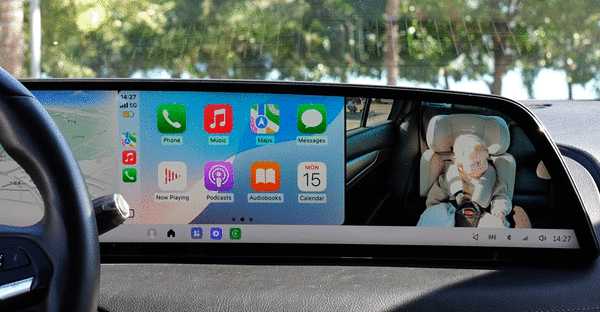
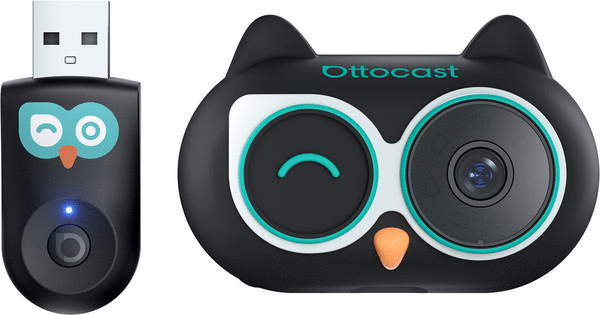
Ottocast has also launched Cabin Care, an integrated baby camera connected to your CarPlay via an adapter, ensuring your precious cargo in the back seat is safe and happy. The system essentially gives you a digital rearview mirror that covers the area where it is placed.
Like the Play2Video Ultra, the Cabin Care also has a minimum setup: Plug in a USB adapter into a port that connects to CarPlay. The camera needs to be placed on the back of the driver's or passenger's headrest to see infants in their car seats. A USB cord can be plugged into any port to power the camera.
Once everything is mounted and powered, while driving, you can safely monitor your rear-seat passengers in real time on your vehicle's display, keeping your eyes focused forward for safe driving. No longer will you have to take your eyes off the road to look in the back seat over your shoulder.
Since I don’t have children, I enlisted my nephew to give it a try, keeping an eye on his three toddlers. His thoughts were, “Watching my daughter and sons in the back seat is so much simpler on the front screen than it used to be, trying to see her in a rear-facing seat through the rearview mirror and a mirror on the seat-back. With split screen with the camera and CarPlay active, the screen was still large enough to see her and the CarPlay screen without difficulty.”
As for the setup, he said it was quick, and connecting the phone to the Cabin Car was straightforward with the provided instructions and immediate on-screen prompts.
He tested it in several vehicles and found it worked flawlessly, especially in models equipped with the latest CarPlay touchscreens. The newer systems featured noticeably improved controls, making it easier to navigate and select icons.
The camera has a 150-degree wide-angle view and 1080p resolution. At night, the quality held its own with no-glow infrared night vision. This allows the video to be captured without the need to add artificial light that could disturb sleeping infants.
Different display modes can be chosen for specific needs, including picture-in-picture, which will overlay a movable camera window over full-screen CarPlay. In the split-screen mode, you can have your navigation map alongside the live feed. Or go full-screen mode to have the camera's live feed on the rear-seat passengers.
Ottocast specifications state Cabin Care supports iPhones with iOS 10 or later (iPhone 6 and above) and requires a factory-installed wired CarPlay touchscreen display.
https://www.ottocast.com/products/cabin-care-wireless-carplay-adapter$109.00
©2026 Gregg Ellman. Distributed by Tribune Content Agency, LLC.





Comments