Jim Rossman: Calendar alerts not sounding? Check the event settings
Published in Science & Technology News
This week, a reader writes, “Do you know why and how to fix problems that I am experiencing on some of my annual calendar alerts? For instance, I did not get either yesterday’s 1 day before or today’s 1 hour alert to give my dog his heartworm medication nor did I get the alerts I had set up to remind me of my adult son’s July birthday. I checked the alerts that I had set up and they are all there; however, I got no notifications. The one-time-only alerts seem to work just fine. I would appreciate any help or suggestions you can give me.”
This can be frustrating, but hopefully this reader didn’t miss her events entirely, just the alert reminders.
The first place I’d look is in the recurring event. Go to that event on the calendar and choose Edit. You can see when the alert was scheduled.
On my calendar, the alert is set by default to none, so I must manually set up an alert time, like 15 minutes before the event.
At the scheduled alert time, I should heard a sound and see a pop up showing me the event.
At the very least, you should see the pop up … and you should also hear the alert. But if you didn’t hear anything, check your speakers to see if they’re on mute or turned down. Also, check to make sure you’re not in Do Not Disturb mode or focus.
You should also check the default alert settings for the Calendar app on your iPhone.
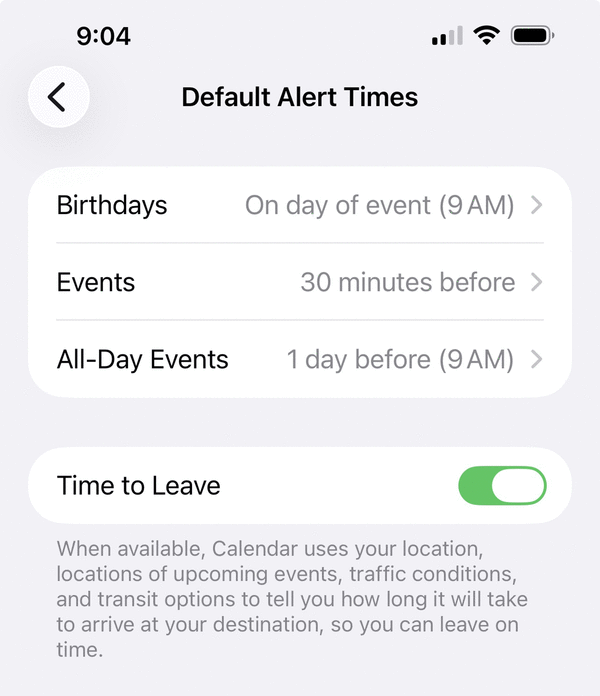
In Settings, go to Apps, then Calendar and then Default Alert Times. You can set a default time for Birthdays, Events and All-Day Events.
With a default alert time set, every new calendar event you set up will automatically have an alert set.
These same instructions apply to Google Calendar alerts as well.
Check the event on the calendar and verify the alert has been scheduled.
Then go to Settings, select My Calendar and then check the Default Notifications section to see what set there.
You should set up a couple test events, both recurring and one-time events, to make sure the alerts are happening as you expect.
©2026 Tribune Content Agency, LLC.





Comments